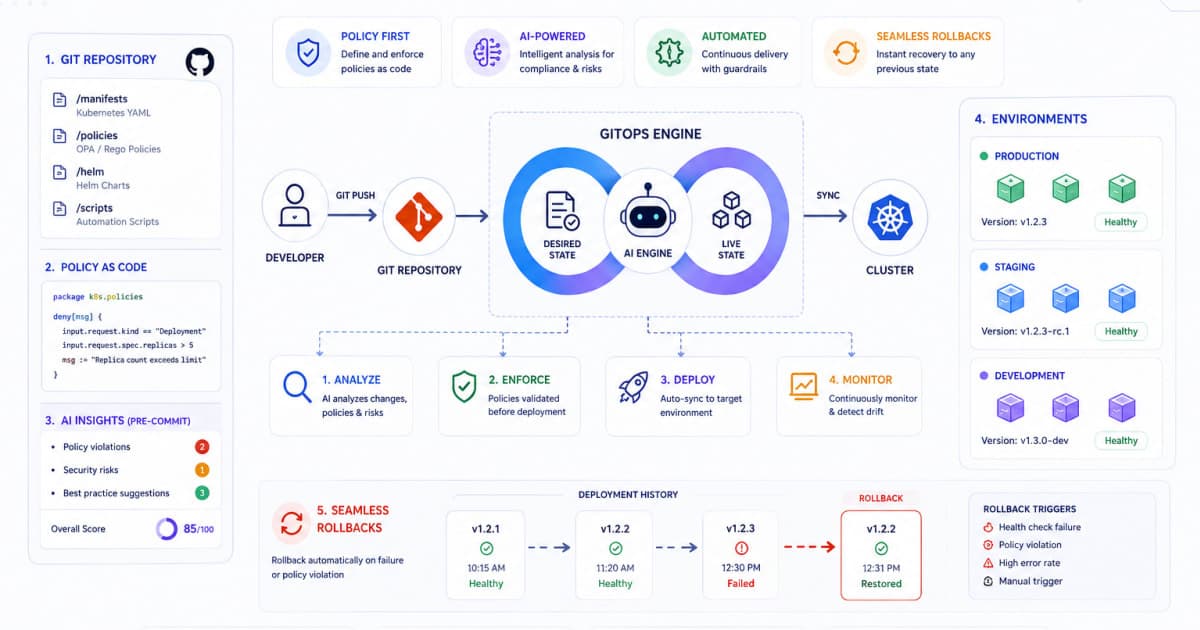
What is Policy‑as‑Code and Why Rego Matters
Policy‑as‑Code Overview
In the modern DevOps landscape, policy‑as‑code means defining security, compliance, and operational rules in a version‑controlled, machine‑readable format. Rather than relying on manual checks or ad‑hoc scripts, policies are expressed in a declarative language and evaluated automatically during every build, test, and deployment cycle.
Rego Language Highlights
Rego, the policy language of the Open Policy Agent (OPA), offers a number of features that make it a natural fit for CI/CD:
Declarative syntax that reads like logic, reducing cognitive load for developers.
Strong typing and inference to catch errors early.
Extensible input allowing policies to be applied to any data structure JSON, Kubernetes manifests, Terraform plans, etc.
Built‑in functions for common tasks (e.g., JSON path queries, string manipulation, hashing).
Integration hooks for CI/CD tools, container runtimes, and API gateways.
Because Rego can be executed as a standalone binary, it can be invoked from shell scripts, CI jobs, or even within a Docker container, making it a versatile choice for automated policy enforcement.
Why Enforce Policies in CI/CD Pipelines
Risk Reduction
Every code commit introduces a potential vulnerability. By evaluating policies in the pipeline, you catch misconfigurations such as exposed secrets, insecure container images, or over‑privileged IAM roles before they reach production.
Compliance
Industries like finance, healthcare, and government mandate strict compliance with standards (PCI‑DSS, HIPAA, GDPR). Automating policy checks ensures that every artifact meets regulatory requirements without manual intervention.
Consistency
Policies codified in Rego are applied uniformly across all environments dev, test, staging, and prod eliminating the “it works on my machine” problem. The same rules that run locally in a pre‑commit hook will run in GitHub Actions, GitLab CI, or Jenkins.
Preparing Your Environment: Installing OPA
System Requirements
OS: Linux, macOS, or Windows
Architecture: x86_64, arm64
Dependencies: None OPA is a single static binary.
Installation Steps
# Download the latest release
curl -L -o opa https://openpolicyagent.org/downloads/latest/opa_linux_amd64

# Make it executable
chmod +x opa

# Move to a directory in PATH
sudo mv opa /usr/local/bin/Tip: Verify the installation with
opa version. The output should display the version and build details.
Verifying Setup
Create a simple policy file allow.rego:
package example

allow {
    input.user == "admin"
}
Run a quick test:
opa eval -i '{"user":"admin"}' -d allow.rego "data.example.allow"You should see true as the result.
Crafting Rego Policies for DevOps Use‑Cases
Common Use Cases
Container image scanning: Ensure images are from trusted registries and contain no known vulnerabilities.
Kubernetes manifest validation: Enforce resource limits, avoid privileged containers, and check for correct RBAC bindings.
Infrastructure as Code (IaC) checks: Validate Terraform plans for disallowed resources or missing tags.
Secret management: Detect hard‑coded secrets in code or configuration files.
Example Policy: Enforcing Container Image Tagging
package k8s.image

deny[msg] {
    container := input.spec.template.spec.containers[_]
    tag := split(container.image, ":")[1]
    not valid_tag[tag]
    msg := sprintf("Container %q uses an invalid image tag %q", [container.name, tag])
}

valid_tag[tag] {
    # Accept only semver tags or 'latest' for CI images
    regex.match("^(\\d+\\.\\d+\\.\\d+|latest)$", tag)
}
This policy uses the built‑in regex.match function; you can test your regex with the Regex Tester.
Parameterization
Policies should be data‑driven. Pass configuration via opa eval --data or as input in the CI job to avoid hard‑coding values. For example, a list of allowed registries can be stored in a JSON file and referenced in the policy.
Integrating OPA with Popular CI/CD Tools
GitHub Actions
Add a step to your workflow:
- name: Run OPA policy check
  uses: open-policy-agent/github-action@v0.1
  with:
    policy: path/to/allow.rego
input: path/to/input.jsonTip: Store the policy and input files in your repo; they will be version‑controlled alongside your code.
GitLab CI
policy_check:
  script:
    - opa eval -i ci_input.json -d policies/ -f pretty "data.example.allow"
  only:
    - merge_requests
Jenkins
Use the OPA CLI in a shell build step:
opa eval -i $WORKSPACE/ci_input.json -d $WORKSPACE/policies/ "data.example.allow"
if [ $? -ne 0 ]; then
  echo "Policy check failed"
  exit 1
fi
ArgoCD and Tekton
Both support sidecar containers. Deploy OPA as a sidecar and expose its REST API. The application manifests can then be evaluated on admission.
Running Policy Checks in the Pipeline
Pipeline Stages
Checkout – Pull source code.
Build – Compile binaries or build Docker images.
Test – Run unit and integration tests.
Policy Check – Evaluate Rego policies against build artifacts.
Deploy – Push to staging or production.
Sample GitHub Actions Workflow
name: CI

on:
  push:
    branches: [main]
  pull_request:

jobs:
  build_and_check:
    runs-on: ubuntu-latest
    steps:
      - uses: actions/checkout@v3

      - name: Build Docker image
        run: docker build -t myapp:${{ github.sha }} .

      - name: Run OPA policy
        run: |
          opa eval -i ci_input.json -d policies/ "data.k8s.image.deny"
        env:
          # Pass any required environment variables
          REGISTRY: ghcr.io
Handling Failures
If the policy evaluation returns a non‑zero exit code, the job fails, and the pipeline halts. This ensures that non‑compliant artifacts never progress to the next stage.
Local Development and Pre‑Commit Validation
OPA CLI
Developers can run policies locally:
opa eval -i local_input.json -d policies/ "data.example.allow"Pre‑Commit Hook
Integrate OPA with the pre-commit framework:
repos:
  - repo: local
    hooks:
      - id: opa-check
        name: OPA Policy Check
        entry: opa eval -i . -d policies/ "data.example.allow"
        language: system
types: [json]Tip: Run the hook on files that match your policy's input schema (e.g., Kubernetes YAML, Terraform plans).
Linting
Use the opa lint command to validate policy syntax and style before committing:
opa lint policies/*.regoMonitoring, Auditing, and Continuous Improvement
Logging
OPA can output detailed logs in JSON format. Configure the OPA_LOG_LEVEL environment variable to debug during troubleshooting.
opa run --log-level=debug
Metrics
Expose Prometheus metrics by running OPA with the --metrics flag. Integrate with Grafana dashboards to track policy evaluation latency and success rates.
Alerting
Set up alerts for repeated policy failures. For example, if more than 5 CI jobs fail due to policy violations in a 24‑hour window, trigger a Slack notification.
Policy Revisions
Use feature flags or environment variables to roll out new policies gradually. Store policy history in Git and tag releases for audit purposes.
Best Practices and Common Pitfalls
Versioning
Tag OPA binaries: Pin to a specific OPA version in your CI scripts.
Semantic versioning for policies: Adopt a versioning scheme (
v1,v2, etc.) and reference the correct policy set per environment.
Documentation
Maintain a README for each policy package.
Explain the intent, input schema, and how to run tests locally.
Test Coverage
Write unit tests for each policy using the OPA testing framework (
opa test).Include integration tests that evaluate policies against real manifests.
Performance
Keep policy files small and modular.
Cache OPA binaries and policy bundles in CI to reduce download times.
Common Pitfalls
Hard‑coding values: Policies should be data‑driven.
Neglecting input validation: Ensure that the input JSON matches the expected schema; otherwise, evaluation may silently pass.
Ignoring error handling: Always check the exit status of OPA evaluations in your CI scripts.
Conclusion and Next Steps
Automating policy enforcement with Rego and OPA transforms the way DevOps teams manage risk, compliance, and consistency. By embedding policy checks directly into CI/CD pipelines, you reduce manual oversight, catch misconfigurations early, and build a culture of security‑by‑design.
Next steps for your organization:
Audit existing processes and identify high‑impact policy areas (e.g., image scanning, IaC validation).
Create a pilot policy and integrate it into a single pipeline.
Expand coverage incrementally, adding more policies and testing them locally with
opa test.Set up monitoring dashboards and alerts for policy violations.
Iterate review policy performance, tweak thresholds, and refine the rule set.
By following this roadmap, you’ll achieve a resilient, compliant, and automated DevOps workflow that scales with your organization’s growth.
FAQs
Q1: Can I use OPA for non‑Kubernetes workloads?
Yes. OPA accepts arbitrary JSON input, so you can evaluate policies for