Resolving CORS Issues When Consuming a Private GraphQL API from a Static Site Generator
I remember the night I was sprinting to finish a demo for a client. The site was built with Gatsby, but when I hit the GraphQL endpoint from the browser, the console exploded with
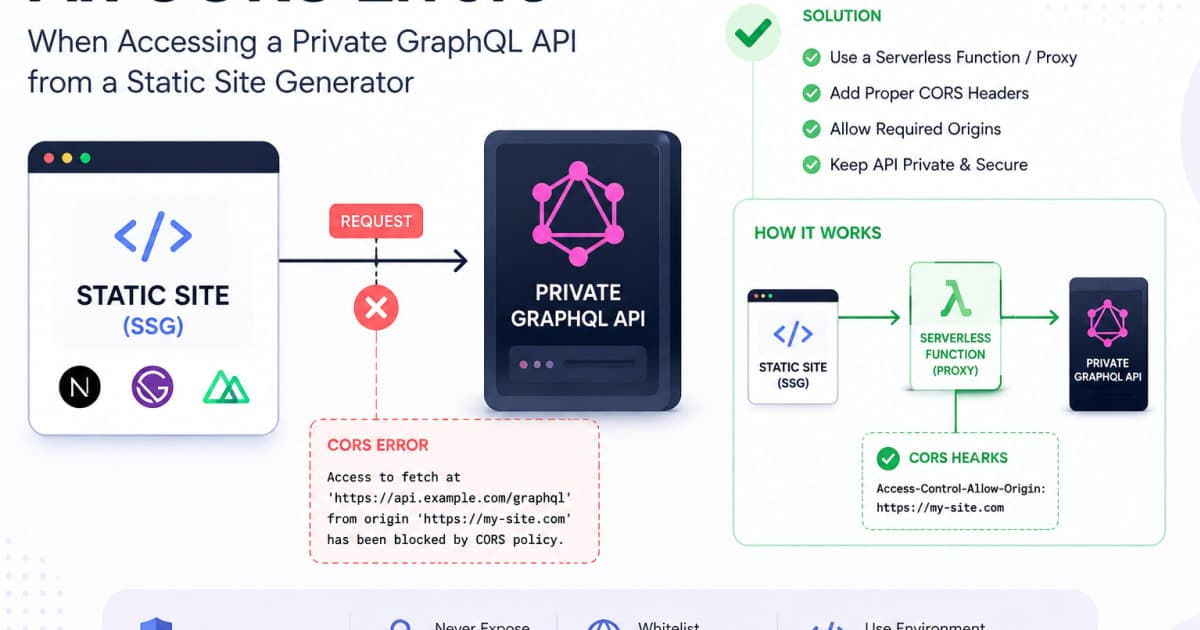
Access to fetch at 'https://api.example.com/graphql' from origin 'https://demo.example.com' has been blocked by CORS policy: No 'Access-Control-Allow-Origin' header is present on the requested resource.
I was staring at my terminal, feeling that classic 2 a.m. panic. The fix was simple, but the path to it was riddled with subtle misconfigurations. This post walks through that journey, from understanding why the browser complains to setting up a robust reverse proxy that lets your static site talk to a protected GraphQL API without breaking the law of the web.
Understanding CORS and GraphQL
CORS (Cross‑Origin Resource Sharing) is the browser’s way of saying, “I’ll let you read this data only if you’re allowed.” When a static site hosted on https://demo.example.com tries to reach https://api.example.com/graphql, the browser first sends a preflight OPTIONS request to check what’s permitted. If the server doesn’t reply with the right Access-Control-Allow-* headers, the browser blocks the actual request.
Wrong way: Direct fetch without credentials
// src/api.js
export async function fetchBooks() {
  const res = await fetch('https://api.example.com/graphql', {
    method: 'POST',
    body: JSON.stringify({ query: '{ books { title } }' })
  });
  return res.json();
}
What you’ll see
TypeError: Failed to fetchin the console, followed by the CORS error above.
Right way: Include proper headers and credentials
// src/api.js
export async function fetchBooks() {
  const res = await fetch('https://api.example.com/graphql', {
    method: 'POST',
    credentials: 'include', // send cookies or auth headers
    headers: {
      'Content-Type': 'application/json',
      'Authorization': `Bearer ${localStorage.getItem('token')}`
    },
    body: JSON.stringify({ query: '{ books { title } }' })
  });
  return res.json();
}
Why it works
TheAuthorizationheader tells the server who you are, and thecredentials: 'include'flag allows cookies to travel across origins. The server must still reply with the matchingAccess-Control-Allow-Originheader, but this is the first step.
Configuring the Private GraphQL Server
If you control the GraphQL server, you can enable CORS with minimal code. I was using Apollo Server on Express, and the first time I forgot to add the CORS middleware, so every request from my site was blocked.
Wrong configuration: No CORS middleware
// server.js
const { ApolloServer } = require('apollo-server-express');
const express = require('express');
const typeDefs = require('./schema');
const resolvers = require('./resolvers');

const app = express();
const server = new ApolloServer({ typeDefs, resolvers });

server.applyMiddleware({ app });

app.listen({ port: 4000 }, () =>
  console.log(`Server ready at http://localhost:4000${server.graphqlPath}`)
);
What you’ll see
In the browser console:Access to fetch at 'http://localhost:4000/graphql' from origin 'http://localhost:8000' has been blocked by CORS policy: No 'Access-Control-Allow-Origin' header is present on the requested resource.
Right configuration: Add CORS with specific options
// server.js
const { ApolloServer } = require('apollo-server-express');
const express = require('express');
const cors = require('cors');
const typeDefs = require('./schema');
const resolvers = require('./resolvers');

const app = express();

app.use(
  cors({
    origin: 'https://demo.example.com', // whitelist your static site
    credentials: true
  })
);

const server = new ApolloServer({
  typeDefs,
  resolvers,
  context: ({ req }) => {
    // Extract JWT from Authorization header
    const token = req.headers.authorization?.split(' ')[1];
    return { token };
  }
});

server.applyMiddleware({ app });

app.listen({ port: 4000 }, () =>
  console.log(`Server ready at http://localhost:4000${server.graphqlPath}`)
);
Why it works
Thecorsmiddleware injectsAccess-Control-Allow-Origin: https://demo.example.comandAccess-Control-Allow-Credentials: true. The server also reads the JWT from the header, so the request is authenticated.
Using a Reverse Proxy or Edge Function
When you can’t modify the GraphQL server perhaps it’s a third‑party service you need a middleman. A reverse proxy or edge function rewrites the request, adds the necessary headers, and forwards it to the API. I used Cloudflare Workers for a project that required zero downtime while I tweaked the server.
Wrong proxy: Missing CORS headers
// worker.js (Cloudflare Worker)
addEventListener('fetch', event => {
  event.respondWith(
    fetch(event.request, {
      // no special headers added
    })
  );
});
What you’ll see
The browser still blocks the request because the response lacksAccess-Control-Allow-Origin.
Right proxy: Inject CORS headers and forward
// worker.js (Cloudflare Worker)
addEventListener('fetch', event => {
  event.respondWith(handleRequest(event.request));
});

async function handleRequest(request) {
  // Forward the original request
  const apiUrl = new URL('https://api.example.com/graphql');
  const newReq = new Request(apiUrl, request);

  // Add auth header if token is present in cookies
  const token = request.headers.get('Cookie')?.split('; ')
    .find(c => c.startsWith('token='))
    ?.split('=')[1];
  if (token) {
    newReq.headers.set('Authorization', `Bearer ${token}`);
  }

  const apiRes = await fetch(newReq);

  // Clone the response to modify headers
  const newHeaders = new Headers(apiRes.headers);
  newHeaders.set('Access-Control-Allow-Origin', 'https://demo.example.com');
  newHeaders.set('Access-Control-Allow-Credentials', 'true');

  return new Response(apiRes.body, {
    status: apiRes.status,
    statusText: apiRes.statusText,
    headers: newHeaders
  });
}
Why it works
The worker forwards the request, attaches the JWT from the cookie, and injects the CORS headers so the browser accepts the response. Cloudflare’s edge makes this lightning‑fast.
Integrating the Proxy with Your Static Site Generator
Now that the proxy is in place, the static site can talk to it as if it were the real API. In Gatsby, for instance, you can override the createPages hook to fetch data through the worker.
Wrong integration: Hard‑coding the GraphQL endpoint
// gatsby-node.js
exports.createPages = async ({ actions }) => {
  const { createPage } = actions;
  const result = await fetch('https://api.example.com/graphql', {
    method: 'POST',
    body: JSON.stringify({ query: '{ books { title } }' })
  }).then(r => r.json());
  // create pages...
};
What you’ll see
Build fails with a CORS error because the build environment is not a browser.
Right integration: Use the worker’s URL
// gatsby-node.js
exports.createPages = async ({ actions }) => {
  const { createPage } = actions;
  const result = await fetch('https://demo.example.com/api/graphql', { // points to Cloudflare worker
    method: 'POST',
    credentials: 'include',
    headers: {
      'Content-Type': 'application/json',
      'Authorization': `Bearer ${process.env.API_TOKEN}`
    },
    body: JSON.stringify({ query: '{ books { title } }' })
  }).then(r => r.json());
  // create pages...
};
Why it works
Gatsby’s Node environment can fetch from the worker because the worker runs on Cloudflare’s edge, not in the browser. Thecredentialsflag is irrelevant during build, but it’s kept for consistency.
Testing and Debugging CORS
Once you have the proxy, you still need to verify that the headers are correct. Two tools I swear by: the browser console and curl.
curl -i -X OPTIONS \
  -H "Origin: https://demo.example.com" \
  -H "Access-Control-Request-Method: POST" \
  -H "Access-Control-Request-Headers: Authorization, Content-Type" \
  https://demo.example.com/api/graphql
What you’ll see
A response withHTTP/2 204 No Contentand headers like:Access-Control-Allow-Origin: https://demo.example.com Access-Control-Allow-Credentials: true Access-Control-Allow-Methods: POST, GET, OPTIONS Access-Control-Allow-Headers: Authorization, Content-Type
If any of those headers are missing, the browser will still block the request. Use the devtools Network tab to inspect the preflight and actual responses. A common mistake is forgetting to propagate the Origin header in the proxy; make sure the worker forwards it or sets the correct value.
Best Practices and Security Considerations
I’ve seen developers expose JWTs in public repos, so I always double‑check that the token lives only in a secure cookie or an environment variable. Use the JWT Decoder to inspect the payload and ensure it contains the expected scopes.
When deploying the reverse proxy, keep your CORS whitelist tight. A wildcard * is tempting but opens your API to every site. Instead, specify the exact origins your static sites will run from.
If you’re using a CI/CD pipeline, consider the CI/CD with Rego Policies - Automate Policy Enforcement article. Rego policies can enforce that only approved origins hit your worker, adding an extra layer of safety.
Finally, remember that CORS is a browser security feature, not a backend security measure. Don’t rely on it to protect sensitive data; always authenticate and authorize on the server side.
Wrapping Up
I’ve walked through the maze that turns a “CORS error” into a working integration between a static site and a private GraphQL API. The key takeaways:
Understand the preflight dance that browsers perform.
Configure your GraphQL server to send the right headers, or use a reverse proxy to add them.
Keep the proxy lean but secure: forward auth tokens, whitelist origins, and inject CORS headers.
Test with
curland devtools to catch any missing headers early.Never trust CORS alone authenticate on the server.
If you’re building a SaaS product where the front‑end is a static site and the back‑end is a protected GraphQL API, this pattern saves you from countless 2 a.m. debugging sessions.
FAQs
Q1: Why does my GraphQL request work in Postman but not in the browser?
A1: Postman doesn’t enforce CORS, so it happily sends the request. The browser, however, blocks it if the response lacks Access-Control-Allow-Origin.
Q2: Can I use the mode: 'no-cors' option in fetch to bypass CORS?
A2: No. no-cors will silently fail the request and give you an opaque response you can’t read. It’s not a solution.
Q3: My Cloudflare worker throws Access to fetch at '...' has been blocked by CORS policy. How to fix?
A3: Ensure the worker’s response includes Access-Control-Allow-Origin matching the requesting origin and Access-Control-Allow-Credentials: true if you’re sending cookies.
Q4: Is it safe to use credentials: 'include' with a public static site?
A4: Only if the JWT or cookie is stored securely (e.g., HttpOnly, SameSite=Strict). Exposing tokens in client‑side code is a security risk.
Q5: Can I use Apollo Client’s setContext to add CORS headers?
A5: No, CORS headers must be set on the server or a proxy. setContext only modifies request headers, which the browser will still block if the server doesn’t respond with the correct CORS headers.