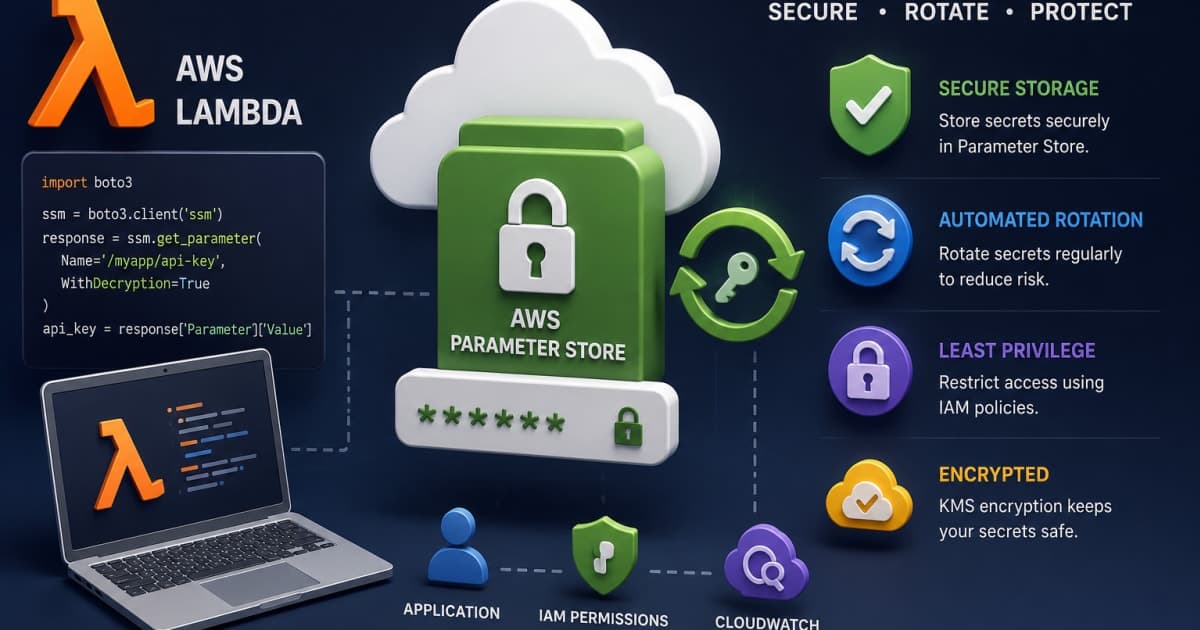
Ever had that moment when your Lambda stops working and the stack trace looks like a cryptic poem? The culprit? A missing API key that slipped through the cracks of your deployment pipeline. That was me, 2 a.m., staring at a cold‑start failure that had nothing to do with code logic. The real lesson? Secrets belong in a vault, not in your source tree or environment variables.
Introduction
When building serverless applications, the temptation to stash secrets in code or environment variables is strong. It’s quick, it’s simple, and it feels secure until you hit the first production deployment. In that moment, you realize that secrets are not just data they’re the keys to your entire infrastructure. If they leak, your entire service can be compromised. If they’re mismanaged, you’ll spend hours chasing down a missing key.
In this post, I’ll walk you through how to securely store and automatically rotate API secrets in AWS Lambda using Systems Manager Parameter Store. I’ll show you the wrong way, the right way, and why the recommended approach matters in a real‑world scenario: a payment gateway that handles credit‑card data and must stay compliant with PCI‑DSS.
Tip: If you’re new to Parameter Store, start by creating a simple test parameter. It’ll give you a feel for the console and the API before you dive into rotation.
Why Choose AWS Systems Manager Parameter Store
Parameter Store is AWS’s lightweight secret management service. Unlike Secrets Manager, it’s free for standard parameters, supports encryption with KMS, and offers versioning out of the box. That makes it an attractive choice for teams that need a cost‑effective, low‑overhead vault.
Wrong: Hard‑coding Secrets in Code
# bad.py
API_KEY = "sk_test_1234567890abcdef"
What you’ll see: Your secret ends up in the Git repo, in CloudWatch logs, and in any stack trace that references the variable. If you push this repo, anyone with read access can see the key.
Right: Store Secrets in Parameter Store
aws ssm put-parameter \
  --name "/myapp/api/key" \
  --value "sk_test_1234567890abcdef" \
  --type SecureString \
  --key-id alias/aws/ssm
Explanation: This command creates an encrypted parameter. The
SecureStringtype ensures the value is stored encrypted using the default KMS key, and the--key-idcan point to a customer‑managed key for tighter control.
Setting Up Parameter Store for API Secrets
The first step is to create the parameter and give it a meaningful name. AWS recommends a hierarchical naming convention that mirrors your environment and service.
aws ssm put-parameter \
  --name "/prod/paymentgateway/api_key" \
  --value "$(openssl rand -hex 32)" \
  --type SecureString \
  --key-id alias/ssm-parameter-store-key
Why
openssl rand -hex 32? It gives you a 64‑character hexadecimal string, which is a good baseline for API keys. If your service requires a different format, tweak the generation step accordingly.
Real‑World Scenario
Your payment gateway must rotate its API key every 90 days to stay PCI‑DSS compliant. By storing the key in Parameter Store, you can automate rotation without touching the Lambda code.
Accessing Secrets Securely from Lambda
A common pitfall is pulling the secret from an environment variable that’s baked into the deployment package. Instead, fetch it at runtime using the AWS SDK.
Wrong: Environment Variable
// lambda.js
const apiKey = process.env.PAYMENT_API_KEY;
Error you’ll see: If you forget to set the env var, you get
undefined, and the downstream API call fails with401 Unauthorized. Worse, if the env var is set in the console, it’s visible to anyone who can view the Lambda configuration.
Right: Fetch from Parameter Store
// lambda.js
const AWS = require('aws-sdk');
const ssm = new AWS.SSM();

async function getApiKey() {
  const params = {
    Name: '/prod/paymentgateway/api_key',
    WithDecryption: true,
  };
  const result = await ssm.getParameter(params).promise();
  return result.Parameter.Value;
}

exports.handler = async (event) => {
  const apiKey = await getApiKey();
  // Use apiKey in your API call
};
What you’ll see:
WithDecryption: truetells SSM to decrypt the value before returning it. The Lambda function now has the secret only in memory, never persisted on disk or exposed in logs.
Implementing Automatic Secret Rotation
Rotating secrets manually is error‑prone. AWS lets you hook a Lambda function to rotate a parameter automatically.
Wrong: Manual Rotation Script
#!/usr/bin/env bash
NEW_KEY=$(openssl rand -hex 32)
aws ssm put-parameter \
  --name "/prod/paymentgateway/api_key" \
  --value "$NEW_KEY" \
  --type SecureString \
  --key-id alias/ssm-parameter-store-key
Problem: Running this script manually can miss the rotation window, and there’s no audit trail of who rotated what.
Right: Rotation Lambda Function
# rotate_secret.py
import json
import boto3
import os

ssm = boto3.client('ssm')
kms = boto3.client('kms')

def lambda_handler(event, context):
    # Event contains the parameter name and version
    param_name = event['parameterName']
    # Generate new secret
    new_secret = os.urandom(32).hex()
    # Store new version
    ssm.put_parameter(
        Name=param_name,
        Value=new_secret,
        Type='SecureString',
        Overwrite=True,
        KeyId='alias/ssm-parameter-store-key'
    )
    # Notify downstream services if needed
    return {'statusCode': 200, 'body': json.dumps('Rotated')}
Attach this Lambda to an EventBridge rule that triggers every 90 days. AWS will pass the parameter name to the function, which generates a fresh key and writes it as a new version.
Why this helps: The rotation is auditable (CloudTrail logs the Lambda invocation), and the old version remains available until the new one is confirmed to work, allowing graceful rollback.
Securing Access with IAM Policies
If you give a Lambda role blanket access to all SSM parameters, you’ve opened a backdoor. Least‑privilege is the rule of thumb.
Wrong: Wildcard Policy
{
  "Version": "2012-10-17",
  "Statement": [
    {
      "Effect": "Allow",
      "Action": "ssm:*",
      "Resource": "*"
    }
  ]
}
What you’ll see: This policy lets the Lambda read, write, delete any parameter in the account. If the Lambda is compromised, the attacker can exfiltrate all secrets.
Right: Minimal Policy
{
  "Version": "2012-10-17",
  "Statement": [
    {
      "Effect": "Allow",
      "Action": [
        "ssm:GetParameter",
        "ssm:GetParameters",
        "ssm:ListParameters"
      ],
      "Resource": "arn:aws:ssm:us-east-1:123456789012:parameter/prod/paymentgateway/api_key"
    },
    {
      "Effect": "Allow",
      "Action": "ssm:PutParameter",
      "Resource": "arn:aws:ssm:us-east-1:123456789012:parameter/prod/paymentgateway/api_key",
      "Condition": {
        "StringEquals": {
          "ssm:ParameterType": "SecureString"
        }
      }
    }
  ]
}
Why this matters: The role can only read or update the specific parameter. All other parameters are off‑limits, reducing the blast radius if the role is hijacked.
Monitoring, Logging, and Auditing
Secrets should never be invisible. You need to know when a secret was accessed or rotated.
Wrong: No Logging
# No CloudWatch or CloudTrail integration
Consequence: If a secret is accessed by an unauthorized process, you’ll never know.
Right: Enable CloudTrail and CloudWatch Logs
aws cloudtrail create-trail \
  --name "SSMAccessTrail" \
  --s3-bucket-name my-trail-bucket \
  --include-global-service-events
Add a CloudWatch log group to your Lambda:
// lambda.js
console.log(`Fetched API key at ${new Date().toISOString()}`);
What you’ll see: CloudTrail records every
GetParametercall, and CloudWatch logs provide a timestamped record inside the Lambda execution. If you need to audit who accessed the key, you can query CloudTrail logs for the event sourcessm.amazonaws.com.
Cost and Performance Considerations
Parameter Store is cheap, but frequent calls can add up if you’re hitting it on every request. Cache the secret in Lambda’s execution environment.
let cachedKey = null;
async function getApiKey() {
  if (!cachedKey) {
    const params = { Name: '/prod/paymentgateway/api_key', WithDecryption: true };
    const result = await ssm.getParameter(params).promise();
    cachedKey = result.Parameter.Value;
  }
  return cachedKey;
}
Why this helps: The secret is fetched only once per Lambda container. Subsequent invocations reuse the cached value, reducing API calls and improving cold‑start latency.
Common Pitfalls and Troubleshooting
Symptom | Likely Cause | Fix |
|---|---|---|
| IAM policy missing | Add the action to the role |
| Parameter name typo or wrong region | Verify the name and region |
| KMS key not accessible to Lambda | Attach KMS permissions to the role |
| Too many | Implement caching or use Parameter Store’s |
Real‑world bug: I once had a Lambda that logged the API key to CloudWatch. The log output was visible to anyone with read access to the log group. Fixing that was a lesson in never logging secrets.
Conclusion and Next Steps
Securing API secrets in Lambda isn’t a one‑off task; it’s a continuous process that blends encryption, access control, and rotation. By storing secrets in Parameter Store, fetching them at runtime, rotating them automatically, and tightening IAM permissions, you build a robust foundation for any sensitive application especially a payment gateway that must stay compliant.
If you’re building a payment gateway and want to dive deeper into PCI‑DSS compliance, check out How to Build a Fully Functional Payment Gateway. The article walks through tokenization, encryption at rest, and secure key management—all essential for a secure payment stack.
FAQs
Can I use Secrets Manager instead of Parameter Store for rotation?
Yes, Secrets Manager offers built‑in rotation, but it comes with a monthly cost per secret. Parameter Store’s rotation requires a Lambda, but it’s free for standard parameters.How do I handle multiple environments (dev, staging, prod) in Parameter Store?
Use a hierarchical naming scheme like/dev/paymentgateway/api_key. Each environment gets its own parameter, and your Lambda’s role should only have access to the environment it runs in.